
Find the log for a Hookshot black screen
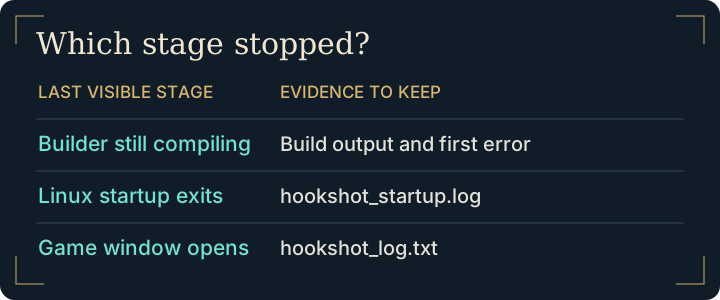
| Last thing visible | First place to look |
|---|---|
| Linux builder closes after Play, no runtime log | hookshot_startup.log in the game folder, including the exit status |
| Game window opens, then turns black or closes | hookshot_log.txt in the game folder |
| Problem occurred on the previous launch | The rotated logs, starting with hookshot_log.1.txt |
| Builder stopped before creating the launcher | The builder error and build failure guide |
Copy the relevant log before another attempt. When documenting a Hookshot black screen, record whether audio continued and whether the screen was black everywhere or only after entering a particular area. A missing character model with visible scenery is a rendering artifact and deserves that specific description.
Check the GPU behind a Hookshot black screen
Check the reported adapter, driver and Vulkan capabilities against the requirements. A laptop may select a different GPU from the one you intended. On Linux, inspect vulkaninfo for mesh shader support on the active device. A device-lost message points toward the rendering path, but cannot identify one universal cause. Preserve the scene and driver details when checking upstream issues.
Recover from a Hookshot black screen after a settings change
If the failure began after a display change, close the game and restore your saved copy of hookshot_options.ini. If you have no backup, move that file aside with the game closed, keep the original, then test a clean launch. This also affects custom controls. Leave the save folder alone. Reapply the last change by itself only after a successful baseline.
Diagnose a Hookshot black screen with sound
Start from the last state that drew a visible frame. If a window was visible before switching display mode, try the previous monitor and display mode first. If you can still open the menu, undo the most recent display change, save and retest. If the menu is invisible too, exit normally if possible, preserve the current options file and compare with the last working configuration. Keep the same save and mods throughout this test.
If the symptom began without a settings change, check the log for the adapter selected and whether a device-lost message coincides with the blank frame. Missing geometry in one room with a visible HUD differs from a blank window throughout startup. Record which parts of the picture remain. A photograph or short recording of the transition can help someone reproduce it; remove any desktop notifications before sharing.
If a clean configuration also fails, restore the copy you set aside and collect the evidence once. Repeated launches rotate older logs and can replace the run you actually need to report.
Frequently asked questions
Can a graphics driver problem leave audio playing?
Yes. Audio continuing tells you the process may still be running, but it does not identify the renderer fault. Note the selected adapter, whether the overlay remains visible and the last display change.
Should I delete the entire game folder to reset display settings?
Preserve the installation and save data. Test an isolated copy of the options file first. A reinstall changes several variables at once and can make a settings-related failure harder to reproduce.
Is a Hookshot black screen on first launch always a crash?
Initial shader preparation can take time. Check for progress or continuing log output, and distinguish it from a recorded exit or a repeatable crash. If the game displays the scene and runs slowly, use the performance guide. For launch failures compare your evidence with the maintainer's troubleshooting table.
What if the game closes before creating its usual log?
On Linux inspect the startup log after the process exits. On either platform note whether Play ever opened a window. That detail separates a launcher problem from a lost rendering device.