
Hookshot: Ocarina of Time PC Recomp Guide
Hookshot turns your own copy of the Nintendo Switch 2 edition of The Legend of Zelda: Ocarina of Time into a program you can run on a compatible Windows or Linux PC. The build happens on your computer.
Start with the official tools and check which game files you need. If you already have a build, jump to controls, save transfers or the guide for the problem you see on screen.
- Native PC Recompilation
- Windows & Linux
- Open-Source Project
- Your Own Game Files Required
What Is Hookshot?
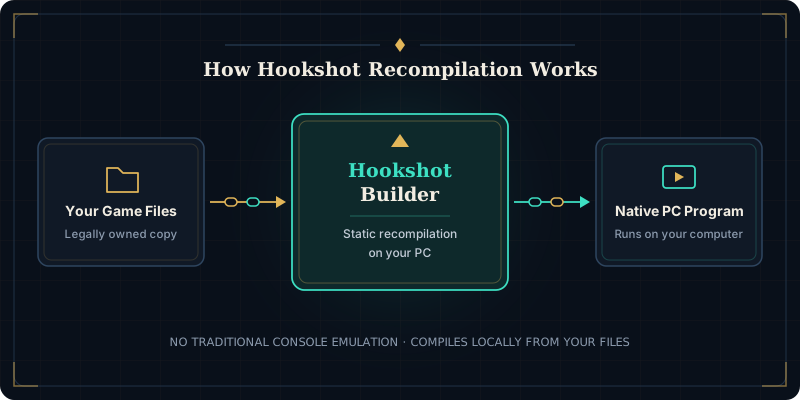
Hookshot is NotRexed’s open-source project for the Switch 2 remake of Ocarina of Time. The word “recomp” is short for static recompilation. The tool translates the game’s code ahead of time so your processor can run it as a desktop application.
That distinction matters when choosing a download. An emulator gives you an environment for running console software. Here you start with a tool for one particular game. With the Hookshot Builder, your PC compiles that program locally. You can compare this approach with emulation in our Hookshot vs Lichii guide.
Because the project distributes only the recompilation tools and runtime framework, it does not include the game itself, ROMs, or decryption keys. You must provide your own legally obtained copy of the supported game files so the builder can extract assets and assemble a working executable locally.
How Does Hookshot Work?
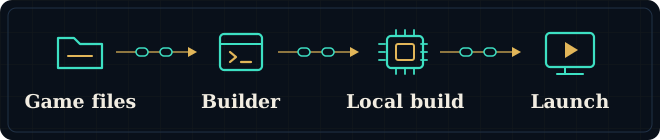
Before opening Hookshot Builder, check two things: whether your copy is the supported edition and whether the PC that will run it meets the requirements. Passing one check still leaves the other. Once both are in place, use the builder guide to work from your own files to a local installation.
Prepare Your Own Game Files
Check the edition of your own copy first. Two copies with the same game title can contain different code. The compatibility guide explains what to compare before you build.
Open Hookshot Builder
Choose the tool for your operating system from the project’s official releases. Open the builder and select your game input so it can check the files.
Build on Your PC
Choose where to put the finished game. Leave room on that drive for temporary build files as well as the final installation, then start the build.
Launch and Configure
Open the launcher from the completed installation. Try moving the character and the camera before changing bindings so you can tell which input needs adjusting.
Get Started With Hookshot
Choose the guide for the device you will play on. If you still need the Hookshot tools, start with the download guide. If you already have them, go straight to your platform and follow the route through the first launch.
Download Hookshot
Find the Hookshot release for your operating system. Check the publisher and distinguish the builder from the project’s source code.
Install on Windows
Go from the official Windows builder to your first launch. Check the game input and choose a destination you can find again.
Set Up on Linux
Find the Linux package and follow the instructions for your distribution. If the builder never opens, start with its launch permissions.
Steam Deck Setup
Check Steam Deck compatibility before starting a handheld build. A Linux release alone tells you little about how a particular scene will run on the Deck.
What Do You Need to Run Hookshot?
Review these baseline hardware, software, and file checks before starting a local build.
Operating System
Identify your operating system and processor architecture before downloading Hookshot. The Windows and Linux instructions start with different files.
CPU & Memory
Look up your processor model and installed RAM. Building the game and playing it put different demands on your computer.
GPU & Vulkan
Check the exact graphics chip and driver against the requirements. A card can support Vulkan and still lack a feature the renderer needs.
Disk Space & Game Files
Check free space on the drive where the build will run. Allow for temporary files, the finished installation and the copy you started with.
Explore Hookshot Features and Guides
Once your build runs, use these guides to customize controls, tune visuals, manage saves, and install updates.
Controls & Input
Configure keyboard, mouse, and modern controllers to fit how you like to play. Learn how to adjust bindings, camera behavior, and stick deadzones.
Graphics Settings
Fine-tune display resolution, aspect ratio, and upscaling options for your monitor. Understand how visual settings affect clarity and presentation.
Save Transfer
Coming from another setup? Back up the original save, identify the destination profile and check the transfer instructions before opening the game.
Updating Hookshot
Find out what an update replaces and where your settings live. Keep a separate copy of a working save before updating Hookshot.
Mods & Customization
Learn where community mods are stored and how the native program loads custom assets. Check folder structure rules and compatibility notes before adding tweaks.
Troubleshooting Hookshot Problems
What was the last thing that worked? If Hookshot never finished building, start with the build error. If a completed installation opens a blank window, follow the display checks. If you can see and control the character but movement is uneven, start with the performance guide.
Hookshot Build Failed
The recompilation process exits early, reports missing files, or refuses to write output.
Review common causes including game version mismatches, storage space limits, antivirus interference, and folder permissions.
Fix a failed Hookshot buildHookshot Black Screen
The game window opens to a blank black screen or closes immediately after launch.
Check GPU compatibility notes, graphics driver updates, Vulkan support, and shader initialization troubleshooting steps.
Troubleshoot a black screenHookshot Low FPS
The picture moves unevenly, or the game slows down when you enter a new area.
Revisit the same scene before changing settings. Note whether the slowdown happens once or every time.
Diagnose low FPS and stutter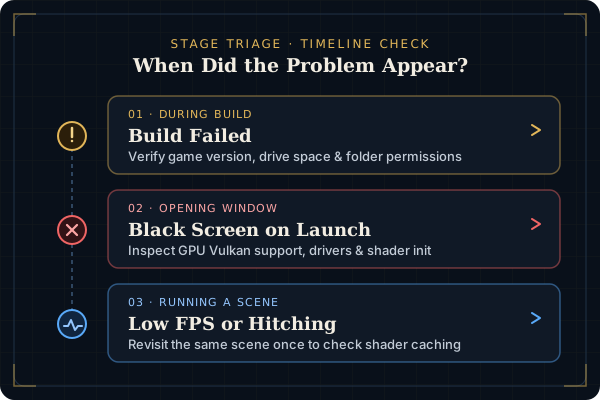
Hookshot vs Other Ways to Play
If you already play on PC, start with what you want to keep: your existing save, your controller setup or a feature you use. Then compare what it takes to get the same result with Hookshot.
Hookshot vs NX2navi
Compare two PC recompilation options for Ocarina of Time side by side. This overview outlines differences in platform coverage, installation workflow, available graphical options, and save data structure.
Hookshot vs Lichii
See how static PC recompilation in Hookshot differs from running the title inside the Lichii emulator. Review setup prerequisites, hardware requirements, update workflows, and overall compatibility.
Hookshot FAQ
Direct answers to common questions about how the project works, what you need to provide, and how this guide operates.
What is Hookshot?
Hookshot is a project by NotRexed for the Nintendo Switch 2 edition of The Legend of Zelda: Ocarina of Time. It compiles your own compatible game files into a native Windows or Linux PC program. See the Builder guide to learn how the build process works.
Is Hookshot an emulator?
No. An emulator provides a console environment while the game runs. This project builds a PC program from the game’s code before you launch it. Read our comparison with Lichii for more details on how the two approaches differ.
Does Hookshot include the game?
No. The project does not include copyrighted game assets, ROMs, or decryption keys. You must provide your own legally owned copy of the supported game version to create a build.
Can Hookshot run on Windows and Linux?
There are official build paths for both systems. Hardware and driver compatibility also matter, especially on a handheld. Start with the Windows installation guide, Linux setup guide, or Steam Deck setup guide for platform-specific instructions.
What does Hookshot Builder do?
The Builder application reads your compatible game files on your local computer and recompiles them into a standalone PC executable. Before running it, review the Builder instructions and verify your system requirements.
Can I move saves between Hookshot and other programs?
The project documents transfers with Lichii and NX2navi. Back up both save folders first, then check the direction of the transfer and the destination profile. Follow our save transfer guide for step-by-step preparation and compatibility checks.
Is hook-shot.org an official Hookshot website?
No. hook-shot.org is an independent fan-built documentation site and is not affiliated with NotRexed or Nintendo. Always download official software releases directly from the NotRexed GitHub repository or review our download guide.
Browse All Hookshot Guides
Choose a guide by the task in front of you, from identifying a download to moving a save between setups.