
Hookshot vs NX2navi installation paths
| Question | Hookshot | NX2navi |
|---|---|---|
| Windows starting point | Run the project’s builder and select a supported input. | Start the official setup executable beside your own compatible game input. |
| Linux starting point | A packaged AppImage provides a graphical builder. | The project documents a native Linux build from source. Its graphical setup and launcher are documented for Windows. |
| Settings | In-game overlay and hookshot_options.ini | In-game menu and nx2navi.ini |
| Updates | Launcher retrieves changed parts and rebuilds locally. | Windows launcher keeps the native build updated. |
| Existing progress | Save-copy helper can import and export supported profiles. | Launcher offers an import path. Close it cleanly before copying pending saves. |
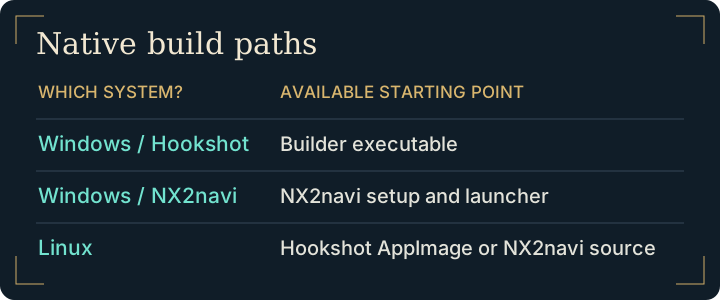
Choosing Hookshot vs NX2navi on Linux
For a Linux desktop where you want a graphical build workflow, follow the Hookshot Linux AppImage path. If you already maintain a source toolchain, read the Linux section of the NX2navi BuildKit instructions before deciding. A native Linux build path does not mean a Windows installer can run natively on Linux.
On Windows, check the option you actually depend on in each project's menu reference. For instance, if a particular controller mapping matters, compare the Hookshot controls with NX2navi’s input reference. Configuration files from the two programs are not interchangeable. Keep separate output directories if trying both.
How to test Hookshot vs NX2navi in the same scene
Use the same save location, resolution, GPU driver and frame-generation state. Record each project's release. A frame rate from Kokiri Forest on one machine cannot establish how another program performs in a dungeon on a different GPU. The upstream Hookshot status and NX2navi README describe coverage and known issues in their own terms.
Choose between native projects for a Linux installation
Take a player who runs Linux, prefers a graphical installer and has an existing NX2navi save. The installation question and the progress question have separate answers. Check the graphical builder path first. Then preview a copy from the existing profile into a separate destination, keeping the original setup available until the new slot loads.
On Windows, write down one requirement before comparing menus: a particular input mapping, display mode, or way of updating. Find that feature in each maintainer's guide, and test it in the same scene if you install both. A longer list of options tells you little about the one you depend on.
Frequently asked questions
Does a Linux source build imply that the Windows launcher works on Linux?
The NX2navi BuildKit documents a Linux build path separately from its Windows setup and launcher. Choose the documented workflow for the host system where you will build.
Can both projects use the same installation directory for a side-by-side test?
Give each its own destination. Each project expects its own executable, generated files and configuration. Use copies of a save for comparison instead of letting two installations write to one profile.
What changes when comparing Hookshot vs NX2navi licenses?
Each distributes its own tools. NX2navi documents separate terms for its additions and third-party code. Check the relevant repository before reusing material. For readers deciding between a dedicated port and an emulator, see Hookshot vs Lichii.
Can I carry an existing slot across?
Make a backup and use the save transfer procedure. Verify the destination slot before continuing. Your graphics and input preferences need to be configured separately.