
Hookshot system requirements by component
| Component | What the maintainer specifies | Where to look |
|---|---|---|
| OS and CPU | 64-bit Windows 10/11 or 64-bit Linux. The packaged Linux AppImage requires AVX2 and glibc 2.35 or later. | Windows Settings → System → About. On Linux use lscpu and ldd --version. |
| GPU and driver | Vulkan 1.3 and mesh shaders. The README lists RTX 20, RX 6000 and Intel Arc families as examples. | Check the actual GPU model, especially on a laptop with two adapters. |
| Memory | The project lists 16 GB system RAM and recommends 8 GB or more graphics memory. | Windows Task Manager → Performance separates Memory from dedicated GPU memory. |
| Storage | About 60 GB free during the build. An SSD is preferable. | Check the destination volume, including space for temporary files. |
Verify the GPU against Hookshot system requirements
The graphics portion of the Hookshot system requirements is easy to misread. A GPU advertised as Vulkan-capable can still lack mesh shaders. On Linux, inspect vulkaninfo for VK_EXT_mesh_shader on the adapter you intend to use. On Windows, compare the GPU model and installed driver with the vendor's specifications and the project status table. The project documents a partial fallback for certain older cards. Missing geometry can persist even if a window appears.
When your PC falls short of the Hookshot system requirements
If the build drive is short on space, choose another writable destination before compiling. If graphics memory is limited, a lower quality preset may reduce pressure after launch. Neither adjustment supplies a missing GPU feature. A model family in the Hookshot system requirements also gives no guarantee that your exact driver will handle every scene.
Check Hookshot system requirements on a dual-GPU laptop
A laptop may list installed RAM, shared GPU memory and dedicated GPU memory on the same screen. Write down the dedicated memory for the adapter the game will use. Increasing the system RAM figure on your checklist does not increase the dedicated memory on that adapter. On a dual-GPU machine, record both GPU names and their drivers; the integrated adapter may expose a different set of Vulkan features.
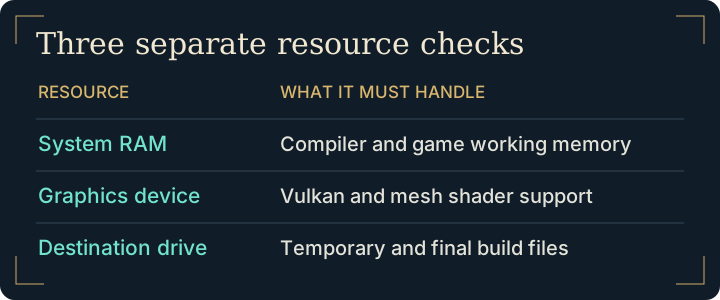
Use two separate checks before committing to a build:
- Can this machine build? Check the processor architecture, OS, system RAM and free space on both the destination and the builder's working drive. If build space is the only shortfall, moving the destination may help.
- Can this machine draw the game? Compare the selected device and driver against the renderer feature requirements. If the graphics feature is missing, a successful compile cannot supply it.
When reading a hardware report, look for the exact adapter, driver, release and scene reached. A title-screen result is evidence for that checkpoint. A report that names a playable area gives you a more useful basis for comparison.
Frequently asked questions
Can I add shared GPU memory to dedicated VRAM when comparing requirements?
Record the two figures separately. The driver's memory budget and the adapter's features matter to rendering. A combined “total graphics memory” number can hide a large difference between two PCs.
Does an SSD change the graphics portion of the Hookshot system requirements?
An SSD can help with file access during a build. The GPU and driver still have to expose the rendering features the game uses when it starts.
Are SteamOS results enough to predict handheld performance?
Check the Steam Deck guide for scene-specific reports. Record the GPU, driver and location when comparing results. Use black-screen diagnosis if the game never draws a frame and low FPS diagnosis if a visible scene runs poorly.
Do the Hookshot system requirements include the game revision?
Input compatibility is a separate check. Compare your game build identifiers and refer to the maintainer's Hookshot system requirements before replacing hardware.