
Find where the Hookshot build failed
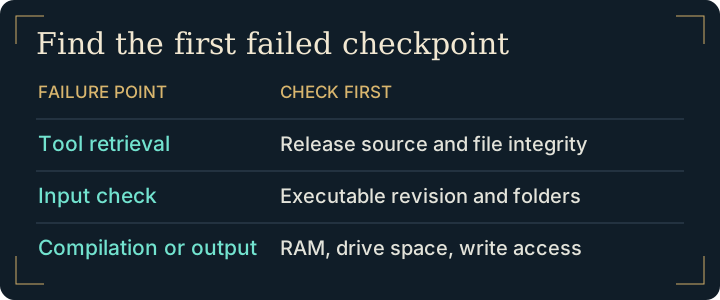
| Stage | Evidence to collect | First check |
|---|---|---|
| Tool setup | Name of the component that failed to download or verify | Confirm the source release and whether the download completed. |
| Input validation | Expected and detected build, selected input type | Compare the supported game version and both extracted directories. |
| Compile or link | First compiler error and available memory | Check system RAM and whether the system closed a process. |
| Write or finalize | Destination path, free space and write error | Check the intended volume and your account's access. |
Check drive access if the Hookshot build failed during output
If the Hookshot build failed while writing output, inspect the drive named in the error. A desktop can have plenty of free space on one drive while its selected build destination is full. Open the destination in the file manager and check the volume's free space. Test whether your normal account can create a small file there. Put a new attempt in a writable local folder if the first choice belonged to another account. Keep your original game input and saves separate.
Repair tools only when the error points there
If Windows Security reports a quarantined component, inspect Protection History and verify the official release before taking further action. A message about the wrong game build belongs to input validation instead. Use the builder's Repair action for a verified incomplete tool installation. Avoid disabling protection across the machine.
Report how the Hookshot build failed
From a source checkout, the maintainer documents a --check mode for validating the input without compiling and a --log option for saving build output. Use the official build reference for the syntax for your input type. For a report give the platform, release, stage, first error and the change you tried. Omit private paths and game data.
Find the first useful line when a Hookshot build failed
A final message that the build stopped tells you little about what to repair. Work backwards to the first failed operation. A validation message naming the supported build appears before compilation. A message that a tool executable disappeared points to the tool installation. A failure opening a destination file after compilation points to disk space, permissions or another process holding that file. Keep the few lines immediately before and after the error.
For a source checkout, the official build script can save a separate log. Add --log and a new log filename to the same documented check or build invocation. The script replaces that file, so give your next attempt a different name. For packaged builds, preserve the text shown by the builder before closing the window.
Example: a build accepts the game and fails while writing to a destination on a nearly full secondary drive. Check free space on that drive and the builder workspace, choose a writable destination with room, and retry with the same validated input. If the same operation still fails, compare the two errors. An issue report that names the failing stage and both outcomes is more useful than a screenshot of an empty installation folder.
Frequently asked questions
How do I know whether an antivirus alert explains the build failure?
Compare the component name and time in the alert with the missing tool in the builder output. Verify the official tool's origin before repairing it. If the builder reports an unsupported game revision instead, investigate the input.
Should I raise the number of compiler jobs to finish a stalled build?
First check whether memory pressure is stopping compilation. Extra simultaneous jobs can increase memory use. For a source build, consult the documented job and memory limits and make one change per retry.
Build completed but Play closes. Should I rebuild?
Start with the runtime and startup logs. A completed installation that fails when initializing graphics has already passed the compiler. If compilation itself stopped, return to the builder workflow and hardware checks.
Can I reuse my input if a Hookshot build failed for lack of space?
A write failure during compilation does not by itself invalidate a previously accepted input. Keep the original, free enough space on the destination or select another volume, and retry the failed build.