
Hookshot supported game version identifiers
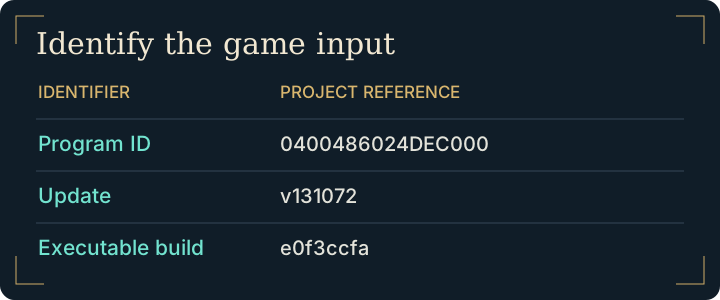
| Identifier | Value documented by the project | Meaning |
|---|---|---|
| Program | 0400486024DEC000 | Identifies the title being checked. |
| Update | v131072 | Identifies the game update expected by the build. |
| Build | e0f3ccfa | Identifies the executable revision. |
A release tag on GitHub identifies a version of the tool. It does not describe which game update is inside your local copy. Consult the maintainer’s input requirements for the release you intend to use.
File formats for the Hookshot supported game version
For a single supported .nup, use the builder's file picker. For an extracted copy, provide both romfs and exefs from the same revision. The first contains game resources and the second contains executable material. Even with the Hookshot supported game version, selecting the parent directory or combining files from different copies can leave the builder without the input it expects.
Check a rejected input against the Hookshot supported game version
- Record the identifier or unsupported-version message shown by Hookshot Builder.
- Confirm that you selected the Switch 2 edition with the expected update. Check where Browse points if you keep several copies on disk.
- For extracted input, return to your original matching folders. Renaming a file or editing the displayed identifier cannot make different game code compatible.
- Continue to Windows installation only after the input is accepted. Errors later during compilation belong in build troubleshooting.
Verify the Hookshot supported game version without compiling
If you maintain a source checkout, the upstream build reference documents a check-only mode. From a correctly prepared checkout, a Windows example for your own file is:
python -I nx2/make_game.py --nup "D:\My games\my-copy.nup" --check
Replace the example path with the real location. The purpose of this command is to identify whether the executable matches the expected revision. A successful check leaves compilation and graphics compatibility untested. If you use the packaged builder, its input-validation step answers this question without setting up a separate source toolchain.
For an unexpected rejection, record the input type, the expected build shown and which source you selected. If two copies are stored on the same drive, compare their full paths. Give a support request the identifiers and message; it does not need the contents of the executable or the resource directory.
Frequently asked questions
Does a matching program ID establish that the update is compatible?
The same title can have multiple executable revisions. Compare the update and build identifiers as well, then let the builder validate the actual input.
Why does the checksum of my installer pass while the game input fails?
Those checks examine different files. The release checksum verifies the downloaded tool. The supported-build check examines your game's executable revision.
Does a ROM with the right title count as a Hookshot supported game version?
No. The N64 release has different program code and assets. It cannot provide the executable expected by this recompilation. Nintendo’s Switch 2 game page and gallery identifies the target edition. This site supplies instructions for files you own and has no game-file or key downloads.
Will downloading another builder convert my game revision?
No. The builder checks the code you provide. Compare your input with the build documented for that release before changing tools.