
Before you install Hookshot on Windows
Check the PC requirements and the game revision. Make a note of the drive where you want the finished game. In File Explorer, check free space on that drive. The build needs temporary working space in addition to the source files you intend to keep.
How to install Hookshot from the Windows builder
- Open the official release and get
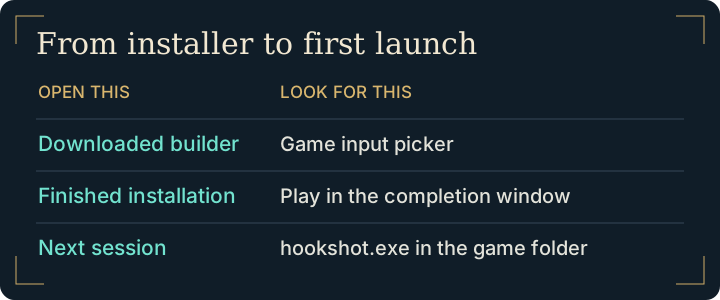
HookshotBuilder.exe. If several assets look similar, use the download file guide. - Run the executable from your normal Windows account. Let it retrieve and verify its components. The next checkpoint is the builder window asking you to select your game.
- Select your own
.nupfile or the matching extracted directories. If Windows stores your game outside the suggested locations, use Browse. The builder guide explains the input choices. - Choose the installation folder and game language. Record the destination before selecting the build action. Keep the machine awake and let the builder report completion.
Start the installed game a second time
Choose Play from the completion screen. Let the initial shaders prepare, reach the title screen, then exit normally. For a second session, use the shortcut you created or open hookshot.exe in the destination you recorded. If a window asks for the original game input again, check whether you opened the downloaded builder by mistake.
If a checkpoint fails
A rejection before compilation points to the input. An error while writing output belongs in build troubleshooting. A completed build that opens a blank window belongs in black-screen diagnosis. Record the last successful checkpoint so you can resume there.
Find the right Windows program after installation
Three similarly named files can be present on one PC. The downloaded HookshotBuilder.exe opens installation. In a completed packaged build, hookshot.exe at the top of the game folder opens the launcher. The executable under bin runs the built game and is used for certain documented command-line options. For a normal desktop shortcut, choose the top-level launcher.
If a shortcut opens the input picker, right-click the shortcut, open Properties, and inspect Target. Compare that path to the destination you recorded at build time. Open the launcher directly from File Explorer. If that works, create a new shortcut to it. Moving just the executable to the desktop separates it from the files that make up the installation.
First-session check. Reach the title screen, try the confirm action, save once when the game permits, quit normally and reopen the same launcher. Seeing the same slot on the next launch gives you a baseline before changing controls, graphics or mods. If the second launch displays a different slot list, check the shortcut target first.
Frequently asked questions
What if Windows opens the input picker after I already built the game?
Check the filename and full path of the running program. The downloaded builder is for installation; the launcher in the completed destination is the ordinary entry point for a second session.
Why does the first launch take longer after the builder finishes?
The first start prepares shaders for rendering. Look for progress or continuing log output before restarting. If the window actually exits, preserve its log and follow the startup diagnosis.
Where can I learn how to install Hookshot from source?
The packaged builder supplies its own compiler. For a source checkout, use the maintainer’s developer build instructions, which distinguish developer prerequisites from the packaged path. Follow the official Windows path for a normal installation.
Can I choose a second drive during setup?
Yes. Choose the destination in the builder before compiling. Place shortcuts only after the installation is complete so they open the launcher in that destination.