
Select your game in Hookshot Builder
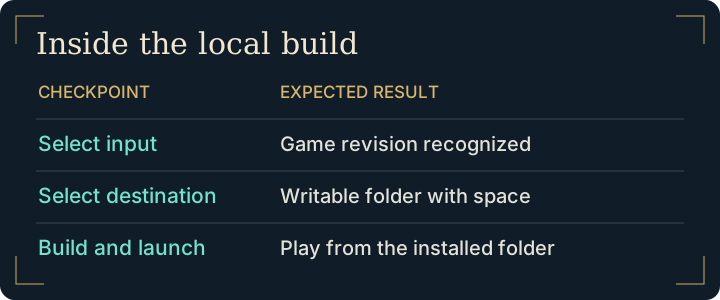
On Windows, look for your copy under Found on this PC. Automatic discovery checks common locations. If your file lives on a second drive, browse to the .nup or drop it onto the window. For an extracted copy, select both romfs and exefs from the same game revision. On Linux, choose the appropriate input mode before browsing.
Wait for Hookshot Builder to identify the input. If it rejects the version here, moving the output folder or lowering graphics quality cannot change that result. Compare the identifiers in the supported game version guide.
Choose the Hookshot Builder output folder
Pick a location your account can write to and note its full path. Allow space for temporary compiler output as well as the installed game. A drive with room for the original file alone may still fill up during compilation. The system requirements distinguish storage, system RAM and graphics memory.
In Hookshot Builder, set the game language before compiling. Leave the original input in place while work is in progress. Hookshot Builder includes its toolchain, so a missing compiler message from the packaged installation is a reason to inspect its status before installing development tools yourself.
Read the Hookshot Builder result
| What you see | What to do |
|---|---|
| The input has been accepted | Verify the destination and begin the build. |
| An error while compiling or writing | Record the first error and the stage. Use the build failure guide. |
| Completion and a Play option | Start the new installation. Initial shader preparation can make the first start longer. |
Where Hookshot Builder reads and writes files
Hookshot Builder can write to two disks during one build. Consider a game input kept on an external drive, an installation on a second internal drive, and Windows running on C:. Selecting the second drive sets the destination for the game. The builder can still use its own per-user directory on the system drive. If a write fails, check the path in the first error before moving the original input.
| Location | How to recognize it | What to do with it |
|---|---|---|
| Source | The file or pair of directories you selected | Keep it readable through the build. |
| Builder workspace | The builder's per-user cache or selected build-files location | Check free space here if compilation stops. |
| Finished installation | The destination with the launcher and game data | Open this folder to play and keep its contents together. |
Hookshot Builder normally cleans up intermediate compiler files. The upstream file layout also describes retaining intermediates for incremental work. For an ordinary first build, the useful evidence of success is the launcher opening the installed game.
Frequently asked questions
Can I select just the resource folder?
For extracted input, the builder also needs the matching executable folder. Select the extracted-input option and provide both paths from the same revision. For a supported single-file input, use the file option instead.
What details help diagnose a Hookshot Builder error?
Keep the operating system, builder release, input type, failed stage and first error message. State whether the tool accepted the input before it failed. You can report those details without sharing game files.
Do I reopen Hookshot Builder every time?
Use the launcher in the finished game folder for subsequent sessions. On Windows it is hookshot.exe. An incomplete output folder is a different situation: return to the failure message before attempting to launch files inside it.
Where does Hookshot Builder put temporary files?
The project normally removes intermediate compilation files after a successful build. Their disappearance alone does not indicate lost progress. See the official file layout and platform instructions.