
Check the Hookshot Linux environment
Check lscpu for AVX2 and ldd --version for the installed glibc. The packaged builder expects glibc 2.35 or later. Check the GPU and storage requirements as well. An AppImage that opens successfully verifies the packaging step, not the capabilities of the Vulkan driver.
Open the Hookshot Linux AppImage
Get the x86-64 AppImage from official releases. In the file manager, open Properties → Permissions and allow execution. In a terminal you can instead type chmod u+x followed by a space and the exact downloaded filename. Run that file as your regular user. If it exits immediately, launch it from a terminal and keep the first error message.
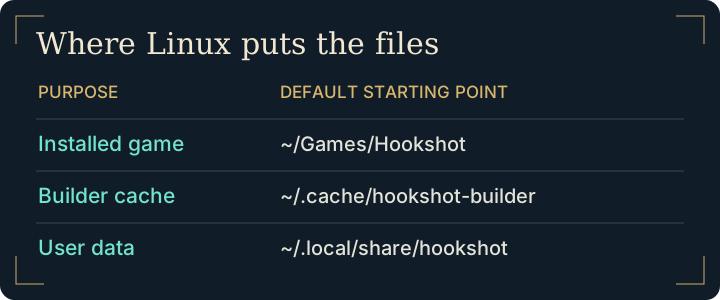
Find your Hookshot Linux install after the build
Choose your compatible file or matching extracted folders. Pick a destination such as ~/Games/Hookshot and select the game language. Start the build. At completion, choose Play. For later sessions, use the application menu entry or the hookshot launcher inside the game folder. Keep the Hookshot Linux AppImage available for updates.
| Location | What belongs there |
|---|---|
| Destination you selected | Game installation, launcher and runtime log |
~/.cache/hookshot-builder | Builder working data |
~/.local/share/hookshot | Default user data, including saves |
Separate startup errors from graphics errors
If the builder runs but Play closes before a game window appears, inspect hookshot_startup.log in the destination. If the game starts and loses its picture, check hookshot_log.txt and the black-screen guide. Linux users seeing a slow AMD path can check the official documentation for GPU memory import permissions. Running the entire game as root is unnecessary.
Diagnose a Hookshot Linux AppImage that opens but cannot start the game
Start the AppImage from a terminal in its own directory, using the exact filename. Keep that terminal open for the first launch. An “execution denied” message before any window appears points to execution permissions or the filesystem where you saved the AppImage. An error after the builder has accepted your input and finished compiling is a later stage.
For a completed installation, compare these three items:
| Check | Expected evidence |
|---|---|
| Launcher location | The hookshot file in the destination you chose. The game binary is one level deeper under bin. |
| First launch | Either a runtime log or, after an early exit from Play, the startup log in the game directory. |
| Graphics driver | The active adapter and the features reported for that same adapter by the Vulkan tools. |
On AMD/RADV, a warning about /dev/udmabuf concerns the memory import path. The maintainer explains the fallback and how to inspect device permissions in the Linux instructions. Preserve the warning and discuss device-specific access with the system administrator rather than starting the whole game with elevated privileges.
Frequently asked questions
Where does the Hookshot Linux builder keep its preferences?
The project documents ~/.config/hookshot/builder.ini for the builder. The finished game's menu preferences live in hookshot_options.ini inside its installation. Identify which program has the unwanted setting before editing either file.
Can I start a specific completed installation from the AppImage?
The documented --play option accepts the built game folder. Use the full path if you keep several installations. The command-line examples are in the upstream build reference.
Does the Hookshot Linux builder need Wine?
The documented Hookshot Linux path is native. Start with the AppImage; Wine is not part of that workflow. For handheld-specific input and GPU behavior, use the Steam Deck guide. See the upstream Linux instructions.
Can I move the Hookshot Linux AppImage after my first build?
Keep it in the location used by the launcher for updates. If a shortcut stops working after a move, check the file it points to before repeating the build.