
What does a Hookshot update preserve?
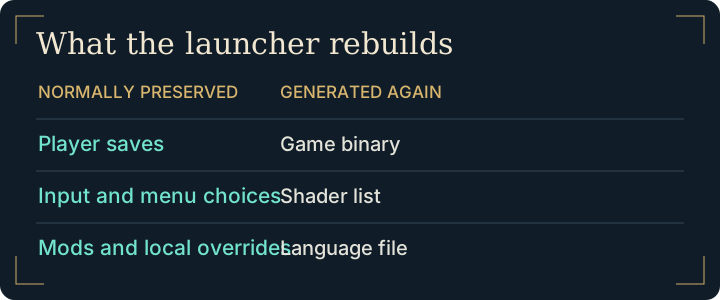
| Keep a backup of | What normally happens |
|---|---|
Windows user or Linux ~/.local/share/hookshot | The updater preserves saves. A separate copy also protects a slot if a new build behaves differently. |
hookshot_options.ini and hookshot_env.txt | Menu preferences, controls and local overrides are kept. |
mods | Installed modifications remain present. Test compatibility if the updated game behaves differently. |
| Built game, shader list and language file | The updater regenerates these parts. Hand edits there can disappear. |
Start a Hookshot update from the launcher
On Windows, open hookshot.exe inside the working game directory. On Linux, open the installed hookshot launcher or the AppImage used for that build. Begin the Hookshot update when the launcher offers Update and confirm the intended installation. Leave enough working space for the rebuild. A normal Hookshot update reuses the game data retained by the first build.
Start the updated game with your existing settings. Check a familiar save slot, a controller binding and one scene you know. If performance changed, save the log before a second launch. Use the same-scene comparison with identical settings.
Choose your Hookshot update channel
The official releases distinguish ordinary releases from entries marked pre-release. The project's nightly build tracks development and carries greater risk to saves or settings. Try it in a separate installation with copied user data if you need a particular change. To return from nightly, follow the maintainer's stable installation instructions.
Recover from an interrupted Hookshot update
First record the release you started from and the stage that stopped: retrieving components, rebuilding, or launching the updated game. Check available working space if the transfer finished but compilation did not. Copy the first error and follow the build failure guide for that stage. Preserve the working game input and the independent save backup while investigating.
If the new version launches but a familiar scene looks different, repeat the scene once with the old settings and mods disabled. Keep the new log and the release notes together. If the issue only appears on a development build, the project describes returning to the ordinary release in its nightly instructions. Restore a separate copy of your profile for the comparison.
Frequently asked questions
Does a Hookshot update need every intermediate release?
Use the update path offered by the installed launcher and read the target release notes for special instructions. A list of earlier tags on GitHub is not a sequence of installers you need to run manually.
Why can rebuilding take time after a small update download?
The tool can retrieve only changed components while still generating local build output again. The amount transferred over the network and the amount compiled on your PC measure different work.
Does a Hookshot update require my original input again?
An intact installation normally retains the inputs it needs. Moving only the launcher to a new folder does not move that installation. If you are rebuilding elsewhere, start with the download guide and keep your backup available.
Why is the slot list empty after a Hookshot update?
First confirm you opened the same installation and profile. An empty list can mean you launched a different copy. Use the save transfer guide to locate the active directory before restoring anything. See the upstream update file list.